Survey Results
Over the course of two weeks, I received replies from the survey I sent to Tigger. He sent it to a group of 10 users who work with The Greenhouse Trust and I received 6 responses. The results certainly showed a wide age, interest and usability range. There are replies from each of the age categories which shows that the charity really does appeal to people of all ages. In addition to this, the occupations of the participants aren’t spread over a common ground and the only two vocations who have more than one selection are environmentalist and scientist. In regards to usability, there is a significant amount of users who browse on desktop computer or laptop. The survey questions looked like this:

The results as individual participants shows:
Age: 26-40
Occupation: An Environmentalist
Preferred browsing platform: Desktop/Laptop
Aspect of interest: Food and ethics
Additional comments: None
Age: 18-25
Occupation: A Student
Preferred browsing platform: Desktop/Laptop
Aspect of interest: Cafe that serves food made from organic and ethically sourced produce. The environmentally friendly aspect of the whole building.
Additional comments: The website would possibly benefit a lot from a bit more modern design, to attract new clientele. Also of more eye-catching information on the great things The Greenhouse Trust does and advocates for – environment and organic food etc (without people having to click on multiple links to find such information, but rather immediately get the good ‘want to visit’ feel for the place).
Age: 41-64
Occupation: A Writer
Preferred browsing platform: Mobile & Desktop/Laptop
Aspect of interest: Everything – but love the bookshop and café
Additional comments: None
Age: 65+
Occupation: A Volunteer
Preferred browsing platform: Tablet
Aspect of interest: All the work it does around artists and how they respond to climate change and the environmental challenges we face. The Greenhouse’s educational role in disseminating this.
Additional comments: I mainly use the website to look at the featured artwork, use the interesting links and to donate. It works well for all three.
Age: 41-64
Occupation: A Scientist
Preferred browsing platform: Desktop/Laptop
Aspect of interest: Energy conservation
Additional comments: Current website is sometimes difficult to navigate, occasionally ending up in places from which there is no return. Very informative though.
Age: 26-40
Occupation: A Scientist & An Environmentalist
Preferred browsing platform: Mobile & Desktop/Laptop
Aspect of interest: Overall running, climate change communications, art sales
Additional comments: None
As you can see from these results, some people were more inclined to share their views than others. I can only put this down to personal preference rather than external factors such as maybe how the question was worded because User 2’s additional comment was an insight into their thoughts about attracting new clientele. This really reminded me of a discussion Tigger and I had in our second meeting. When I asked what the main user group may be, he said he wasn’t really sure and that because the company has adapted and grown over the years, he can’t put his finger on who he is appealing to as much as when the charity was in its younger years. In turn, he isn’t sure he is appealing to the correct audiences so I suggested an improvement to his online presence can have a big impact on the type of user group he can try to steer towards.
Google Forms also enabled me to visualise these overall data groups:
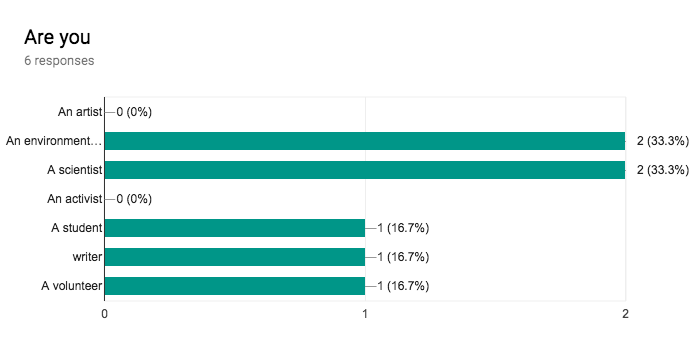
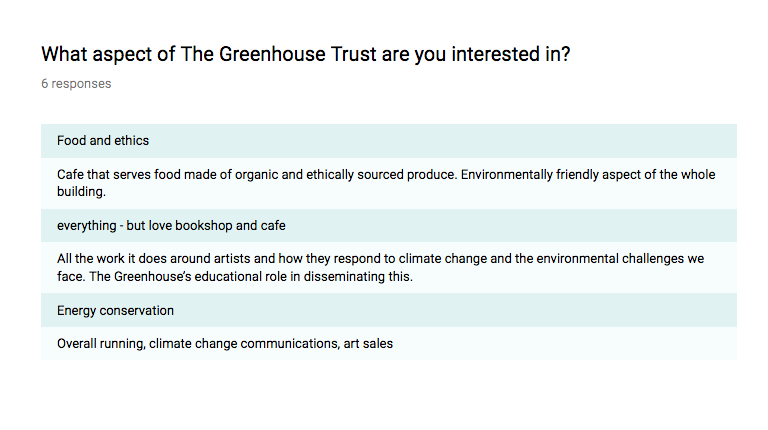
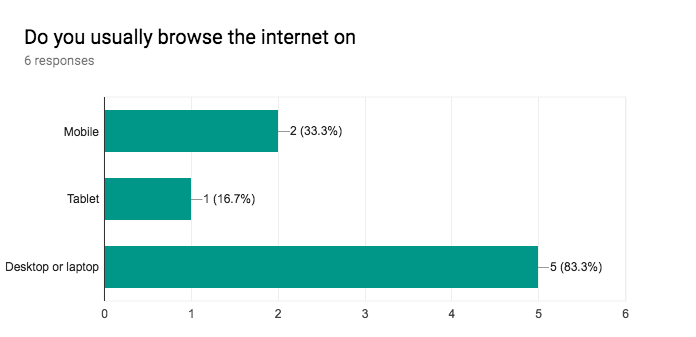
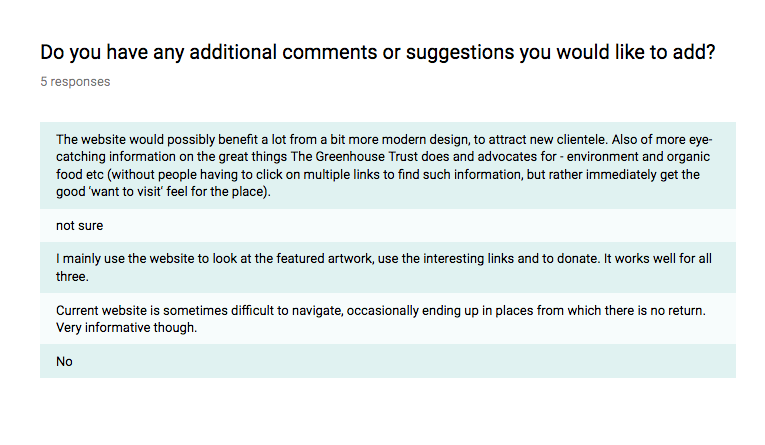
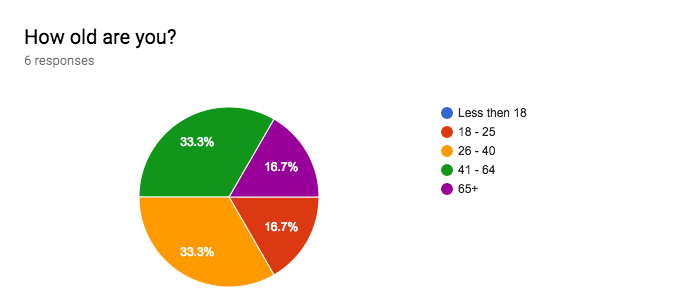
When these results are shown as grouped data it is clearer to see similarities and differences.
The majority of user groups are in the middle age sections (26-40). This can, therefore, be grouped into one main user group of 26-64. I always anticipated there is a large user group and this proves this hypothesis but nevertheless, it adds more definition to my prior conceptions.
Users added ‘A Student’ and ‘A Volunteer’ as occupational options (I had an ‘other’ setting enabled). I actually thought of adding these as options but didn’t want to bombard the participants with too many options but this does confirm my predictions. This was also a multiple choice question so users were able to pick more than one if they felt this to be appropriate. Only User 6 chose two (scientist and environmentalist) however I make the assumption that if this survey was released to more people then I may receive more multiple choice answers. I realise now that they may not have realised this is multiple choice as I did not state this anywhere and guessed that people would know because there are checkboxes. Upon reflection, I don’t think this was instinctual enough and I will define the options clearer in the future. The same applies to the third survey question.
Interestingly, the majority of people use a desktop or laptop to browse the website. I wonder if this is because of personal preference, because the website does not scale well on mobile or because the type of tasks they wish to perform on the website isn’t suitable for a small screen. Only User 3 and User 6 chose to take advantage of the multiple choice aspect of this as well.
Paper Prototype
For my hybrid card sorting exercise, I wrote up 30 content cards and six menu headers.
My menu headers:
- Home
- About
- The Greenhouse
- Café & Shop
- Volunteer
- Donate
Content cards:
- Find the cafe – a google maps API to show visually where the cafe is along with the address
- Contact the cafe – how to get in touch via e-mail, telephone etc.
- How to volunteer – how to get in contact about a volunteering role
- About volunteering – information about the volunteering at the greenhouse
- How to donate – available payment methods
- Why you should donate – information about the project’s donations will be funding
- What charity am I donating to – information about the projects that the donations will be funding
- Associated charities – who The Greenhouse Trust is in partnership with
- Link to the donation site – a click-through link to the external donation page
- The history of the greenhouse – a history of the greenhouse building and company
- Environmental features of the greenhouse – specialist environmental features built into the greenhouse building
- Local history – history of the local and surrounding area
- Meet the team – images, names and descriptions of the people who work or volunteer at The Greenhouse Trust
- Cafe opening times – operating times of the cafe
- Cafe menu – a menu of the most current food and drinks they serve in the cafe
- Organic food shop information – information about the products they sell in their organic food store
- The greenhouse suppliers – what companies do they get their produce from
- Wine menu – a list and prices of organic wine they sell
- Current events at the cafe – an up-to-date schedule of events happening at the cafe
- Promotions – promotional offers on wine and food etc
- (Organic) wine information – how and why organic wine is produced
- (Organic) food information – how and why organic food is served at the cafe
- Art gallery – an online presentation of art featured from local artists
- Art exhibition information – information regarding local art exhibitions in the area
- Writing gallery (poems) – an online presentation of poems written by local poets
- Bookstore opening times – operating times of the bookstore
- Bookstore information – where the money from donations will go
- How to buy a book – how to purchase a book (online and in-store)
- Garden information – seasonal operating times of the garden
- Social media links – clickable links to the social media platforms
Digital Prototype
For the digital aspect of my prototype testing, I took the user persona ‘Deborah’ from my previous user research work and integrated some results from the information gathered from the survey. The user persona read as:
“Deborah is a 56-year-old female from Norwich who is married and has 2 children. Issy is 18 and Mike is 16 and both of them attend City College. They all live together at home and are classed as a middle-class family. Deborah isn’t very physically active apart from her enjoyment of walking around doing a spot of shopping on the weekends. Although unemployed, she still has busy days spent cleaning the house, preparing food for the other family members and indulging in reading and crocheting. She loves spending time with her family over dinner and with her husband attending cello concerts at various venues around Norfolk. She has an iPhone 7 because her children recommended it and the guy in the shop said it was the pink one was perfect for her. In the tech world, she classes as a late adopter, meaning that she catches onto technological trends after the mass surge resulting in her always asking her children “What if I press this?”. Due to the combination of free time and a smartphone, she spends the time in between hobbies scrolling through her Facebook feed (which Issy kindly set up for her) and reading through news articles on the BBC News app. Along with this, they have a family computer that she likes to browse on after dinner whilst everyone is doing their own thing. She wears reading glasses so sometimes its difficult for her to see small pieces of text and she always clicks on top articles because they tend to have bigger bolder typefaces. In addition to this, she is always keen to click on pictures of cute animals or bright crochet designs. Deborah has been a vegetarian for 16 years now as part of a preparation plan for when her menopause starts. She wants to make sure her body is happy and healthy so along with this she takes vitamins and eats fruit and veg regularly. She is an extroverted person and loves meeting people who share her interests and she is part of a ‘Vegetarian Mums’ group on Facebook. She would easily spark up a conversation with the cashier at the supermarket about a lovely coffee she got the other day with her friend Angie.”
In turn, the task I asked the users to perform reads:
“You have heard about the café from Angie but the description was very vague. You want to find out more information about what they do so you go to their website to find out more. Secondly, you are interested in finding where it is in relation to the Forum car park because that’s where you usually park your car. Issy is currently looking for volunteer work and wants to know if the role is for her and how best to get in contact.”
I also added some dummy landing pages for my WordPress site so when the user performed the tasks I asked, they were learning real-life information along the way. For example in the part of the task where I asked the user to find the café, I had installed a Google Maps API into the ‘Find Us’ page so they could interact with this as well. The testers also commented on the use of the API and suggested ways in which I can improve it which was constructive and positive.
